Architecture Overview
ArmoniK is built as a composable framework: its orchestration core plugs into standard infrastructure services (queue, object storage, database) rather than bundling its own. This design lets you swap in cloud-managed services (SQS, S3, Pub/Sub) or self-hosted alternatives (RabbitMQ, MinIO) without changing your application code.
        flowchart TB
    subgraph TOP[" "]
        direction LR
        Queue["fa:fa-tasks<br/>Queue System"]
        ObjectStorage["fa:fa-database<br/>Object Storage"]
        Mongo["fa:fa-leaf<br/>MongoDB"]
        IAM["fa:fa-shield<br/>IAM"]
        Logging["fa:fa-file-text<br/>Logging System"]
    end

    ADS["ArmoniK<br/>Distributed Scheduler"]

    subgraph BOTTOM[" "]
        direction LR
        AutoScaler["fa:fa-arrows-alt<br/>AutoScaler"]
        ResourceAllocator["fa:fa-microchip<br/>Resource Allocator"]
    end

    Admin["fa:fa-user-plus<br/>Admin Client"]
    ComputeClient["fa:fa-user<br/>Compute Client"]
    ComputeLib["fa:fa-code<br/>Compute Library"]

    Queue === ADS
    ObjectStorage === ADS
    Mongo === ADS
    IAM === ADS
    Logging === ADS

    ADS === AutoScaler
    ADS === ResourceAllocator

    Admin ==> ADS
    ComputeClient ==> ADS
    ADS ==> ComputeLib

    style ADS fill:#ff5a00,color:#ffffff,stroke:#ff5a00,font-size:18px
    style TOP fill:transparent,stroke:transparent
    style BOTTOM fill:transparent,stroke:transparent

    linkStyle default stroke-width:4px
The infrastructure components used vary by deployment target:
Deployment type |
Queue |
Object Storage |
IAM |
Logging |
Autoscaler |
Resource Allocator |
|---|---|---|---|---|---|---|
Vanilla Kubernetes |
ActiveMQ |
MinIO |
— |
Fluent Bit / Seq |
KEDA |
Kubernetes |
Amazon Web Services |
SQS |
S3 |
AWS IAM |
CloudWatch |
KEDA |
EKS |
Google Cloud Platform |
Pub/Sub |
GCS |
GCP IAM |
Cloud Monitoring |
KEDA |
GKE |
Components
Control Plane
The Control Plane is the central gRPC service of ArmoniK. It is the single entry point for clients and is responsible for:
Creating and managing sessions (logical groupings of related tasks)
Accepting task submissions and storing task metadata in the database
Tracking task dependencies: a task is only dispatched once all its declared dependencies are complete
Enqueuing tasks that are ready to execute into the message queue
Exposing task and session state to clients and to the Admin GUI
Compute Plane
The Compute Plane is the set of pods that execute your workload. Each replica runs two containers side by side:
Polling Agent — the ArmoniK-provided sidecar that polls the queue for work, fetches task payloads from object storage, drives task execution on the Worker, and reports results back to the Control Plane.
Worker — your application container, which receives tasks from the Polling Agent over a local gRPC connection and returns results.
The Compute Plane is divided into partitions: isolated groups of pods with their own queue, worker image, node selector, and scaling configuration. See the partitioning guide for setup details.
Metrics Exporter
The Metrics Exporter reads task-state counts from the database and exposes them as Prometheus metrics. KEDA reads those metrics to decide how many Worker pods each partition needs. See scaling & performance for tuning guidance.
Supporting infrastructure
Service |
Role |
|---|---|
Queue |
Carries task dispatch messages from the Control Plane to the Polling Agents |
Object Storage |
Stores task payloads (inputs) and results (outputs) |
Database (MongoDB) |
Stores task metadata, session state, and result references |
KEDA |
Scales Compute Plane pods up and down based on queue depth metrics |
IAM |
Authentication and authorization (cloud deployments) |
Logging system |
Aggregates logs from all components for debugging and audit |
Task Lifecycle
The sequence below shows how a task travels from submission to completion.
        sequenceDiagram
    participant C as Client
    participant CP as Control Plane
    participant DB as Database
    participant Q as Queue
    participant PA as Polling Agent
    participant OS as Object Storage
    participant W as Worker

    C->>CP: CreateSession()
    C->>OS: Upload task payload
    C->>CP: SubmitTasks(payloadRef, deps…)
    CP->>DB: Store task (status: Submitted)
    CP->>Q: Enqueue tasks with no pending deps

    PA->>Q: Poll for task
    Q-->>PA: Task message
    PA->>OS: Fetch payload
    PA->>W: ProcessTask(payload)
    W-->>PA: Result + optional sub-tasks
    PA->>OS: Store result
    PA->>CP: ReportComplete + SubmitSubTasks
    CP->>DB: Update task (status: Completed)
    CP->>Q: Enqueue newly unblocked tasks
Dependency resolution — tasks can declare dependencies on the results of other tasks. The Control Plane tracks these automatically and only enqueues a task once all its dependencies are satisfied. This lets you express DAG-shaped workflows without any polling or sleeping in application code.
Sub-task submission — a Worker can submit new tasks during its own execution. This enables recursive and tree-shaped workloads where the full task graph is not known upfront.
Fault tolerance — if a Worker pod is lost mid-execution, the Polling Agent’s lease on the task expires and the Control Plane re-enqueues it for another pod to pick up, up to the configured MaxRetries limit.
Internal Architecture
The diagram below shows the internal wiring of an ArmoniK deployment, including the gRPC interfaces between components.
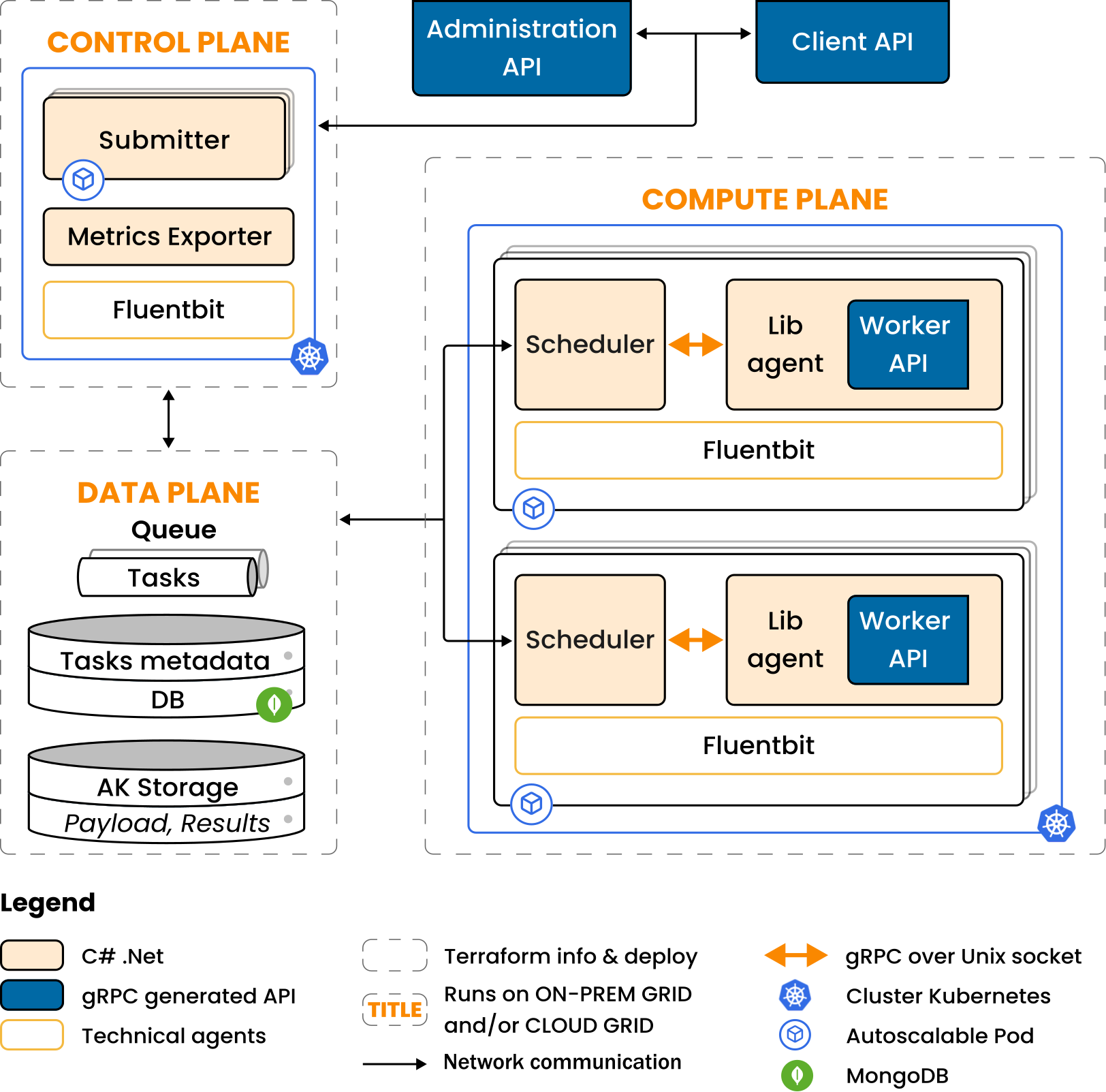
The key interfaces are:
Interface |
Protocol |
Direction |
|---|---|---|
Client → Control Plane |
gRPC (ArmoniK API) |
Session and task management |
Control Plane → Queue |
AMQP / SQS / Pub/Sub |
Task dispatch |
Control Plane ↔ Database |
MongoDB wire protocol |
Task and session state reads/writes |
Polling Agent → Control Plane |
gRPC |
Status updates, sub-task submission |
Polling Agent ↔ Object Storage |
S3-compatible API |
Payload fetch, result store |
Polling Agent → Worker |
gRPC (local) |
|
Metrics Exporter → Prometheus |
HTTP (scrape) |
Task-state metrics |
KEDA → HPA |
Kubernetes API |
Scale decisions |
Admin GUI
The Admin GUI is a web application that connects to the Control Plane’s gRPC API and lets operators:
Browse sessions and tasks, filter by status, partition, or time range
Cancel sessions or individual tasks
Inspect task inputs, outputs, and error messages
Monitor partition queue depths and worker counts in real time
See Personalizing the Admin GUI for configuration options.